Biomarker Analysis Catalog - Stable
  • Stable
    • Dev
  1. Graphs
  2. RNAG
  3. RNAG7
  • Index

  • Tables
    • CPMT
      • CPMT1
      • CPMT2
        • CPMT2A
      • CPMT3
    • DT
      • DT1
        • DT1A
        • DT1B
        • DT1C
      • DT2
        • DT2A
    • TET
      • TET1
        • TET1A

  • Graphs
    • AG
      • AG1
    • DG
      • DG1
        • DG1A
        • DG1B
      • DG2
      • DG3
        • DG3A
      • DG4
    • KG
      • KG1
        • KG1A
        • KG1B
      • KG2
        • KG2A
      • KG3
      • KG4
        • KG4A
        • KG4B
      • KG5
        • KG5A
        • KG5B
    • RFG
      • RFG1
        • RFG1A
      • RFG2
        • RFG2A
        • RFG2B
        • RFG2C
      • RFG3
    • RG
      • RG1
        • RG1A
        • RG1B
        • RG1C
      • RG2
        • RG2A
      • RG3
        • RG3A
        • RG3B
    • SPG
      • SPG1
      • SPG2
    • RNAG
      • RNAG1
      • RNAG2
      • RNAG3
      • RNAG4
      • RNAG5
      • RNAG6
      • RNAG7
      • RNAG8
      • RNAG9
      • RNAG10
    • SFG
      • SFG1
        • SFG1A
        • SFG1B
      • SFG2
        • SFG2A
        • SFG2B
        • SFG2C
        • SFG2D
      • SFG3
        • SFG3A
      • SFG4
      • SFG5
        • SFG5A
        • SFG5B
        • SFG5C
      • SFG6
        • SFG6A
        • SFG6B
        • SFG6C
  1. Graphs
  2. RNAG
  3. RNAG7

RNAG7

RNAseq Boxplot

RNAG

  • Setup: Import, Filter and Normalize
  • Boxplot for Single Gene Expression Values
  • Boxplot for Multiple Genes Expression Values
  • Boxplot for Gene Signatures
  • Additional Options for Customization
  • Teal Module for Boxplot
  • Session Info

This page can be used as a template of how to create boxplots for RNA-seq gene expression data using available hermes, and to create interactive boxplot for RNA-seq gene expression analysis using teal.modules.hermes.

The draw_boxplot() function used below needs HermesData as input. See RNAG1 for details on how to import, filter and normalize HermesData.

Code
library(hermes)
object <- hermes_data %>%
  add_quality_flags() %>%
  filter() %>%
  normalize()

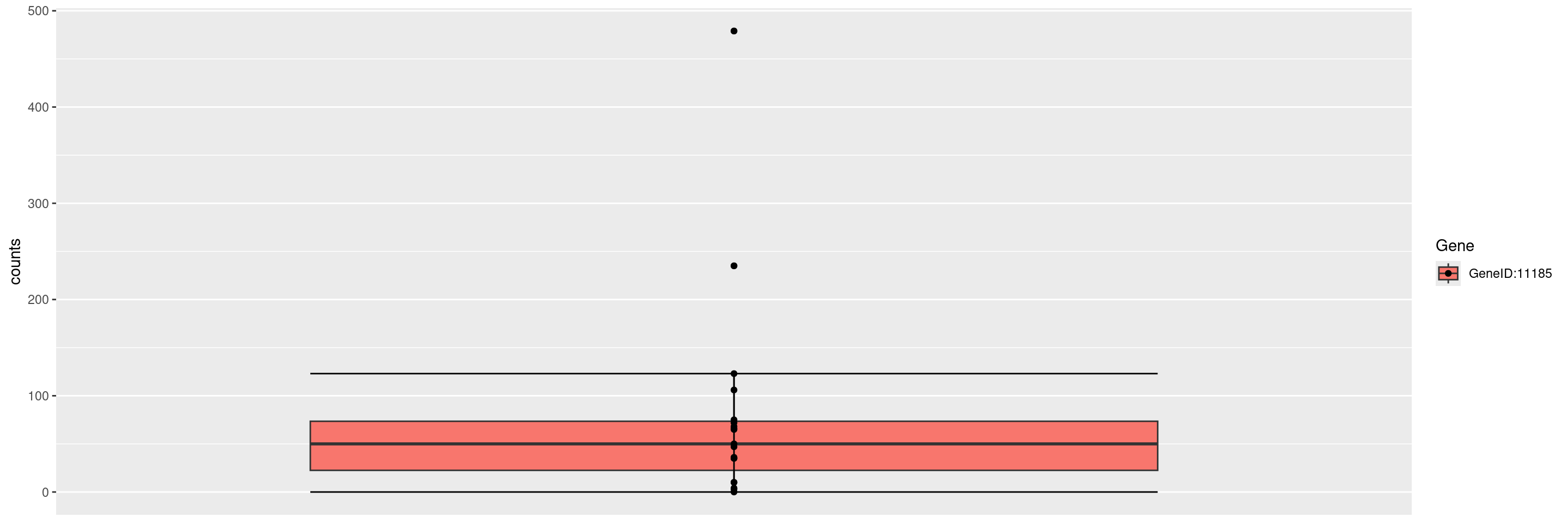
We can create boxplots for expression values of single genes by providing the gene ID in a gene_spec (gene specification) as follows.
Code
draw_boxplot(
  object = object,
  assay_name = "counts",
  genes = gene_spec("GeneID:11185")
)

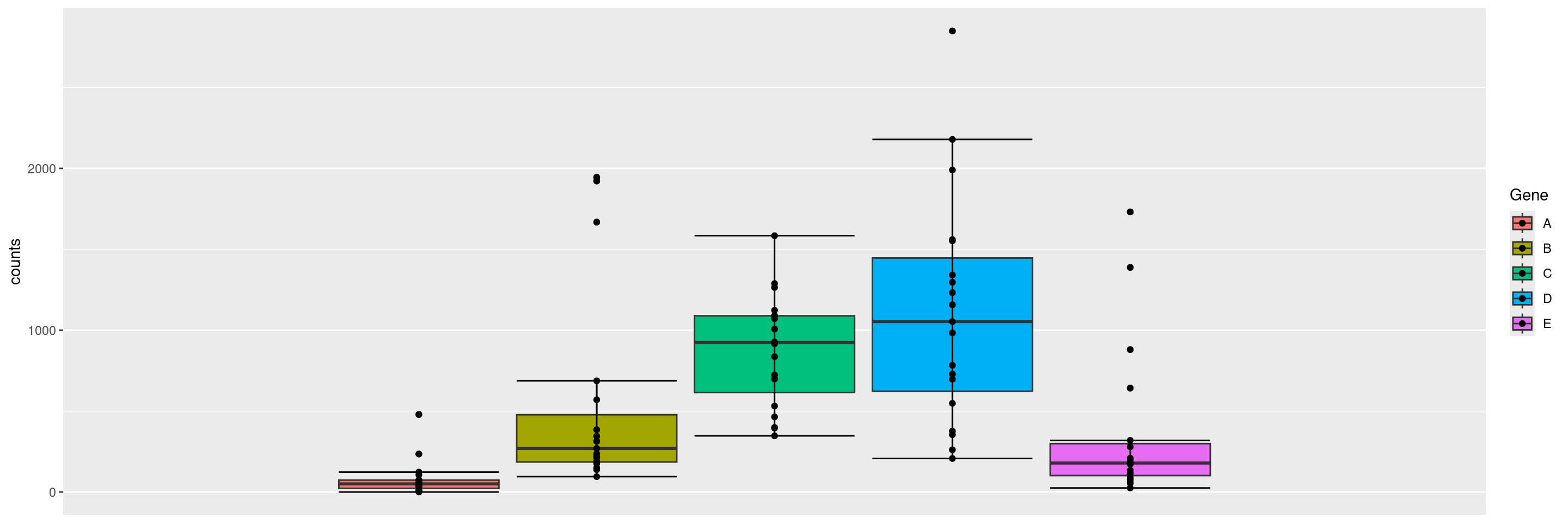
We can also create boxplots for multiple genes next to each other, simply by specifying multiple gene IDs in the gene_spec. Note that names given to the gene ID vector are used in the plot instead of the IDs.
Code
draw_boxplot(
  object = object,
  assay_name = "counts",
  genes = gene_spec(c(
    A = "GeneID:11185", B = "GeneID:10677", C = "GeneID:286205", D = "GeneID:8365", E = "GeneID:6804"
  ))
)

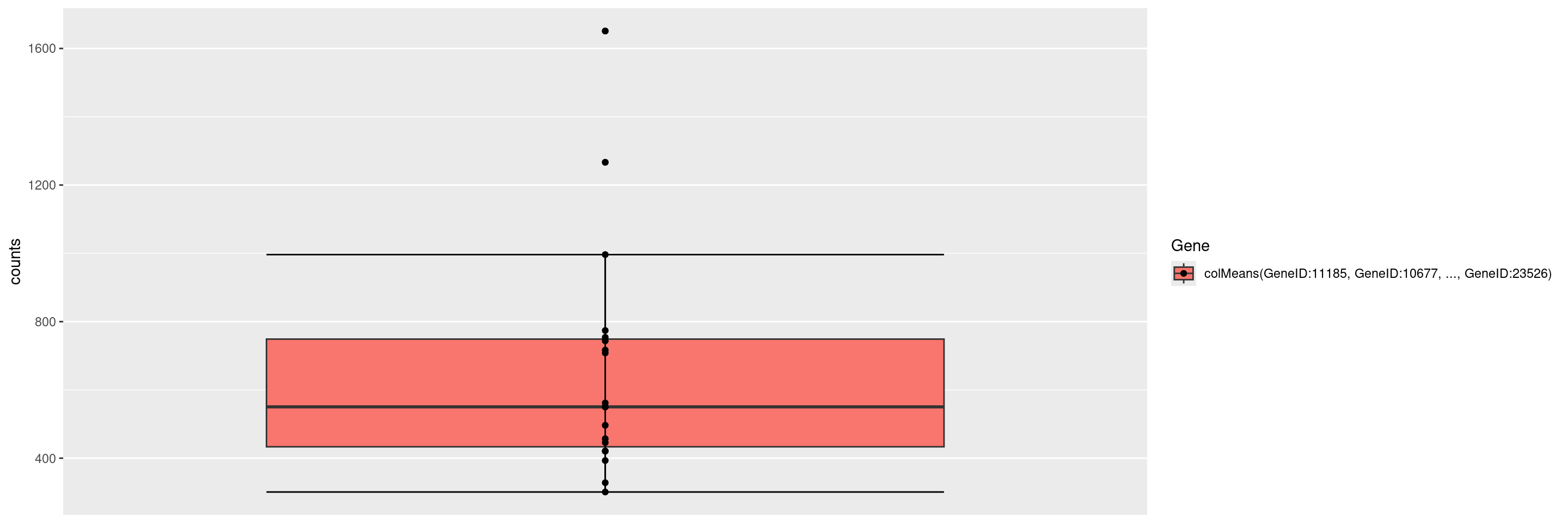
We can also specify a gene summary function for multiple genes, thereby using the corresponding gene signature. Note that here we just want to use the first 6 genes from the object without explicitly specifying the gene IDs, and this can be done through the genes() function in hermes.
Code
draw_boxplot(
  object = object,
  assay_name = "counts",
  genes = gene_spec(genes(object)[1:6], fun = colMeans)
)

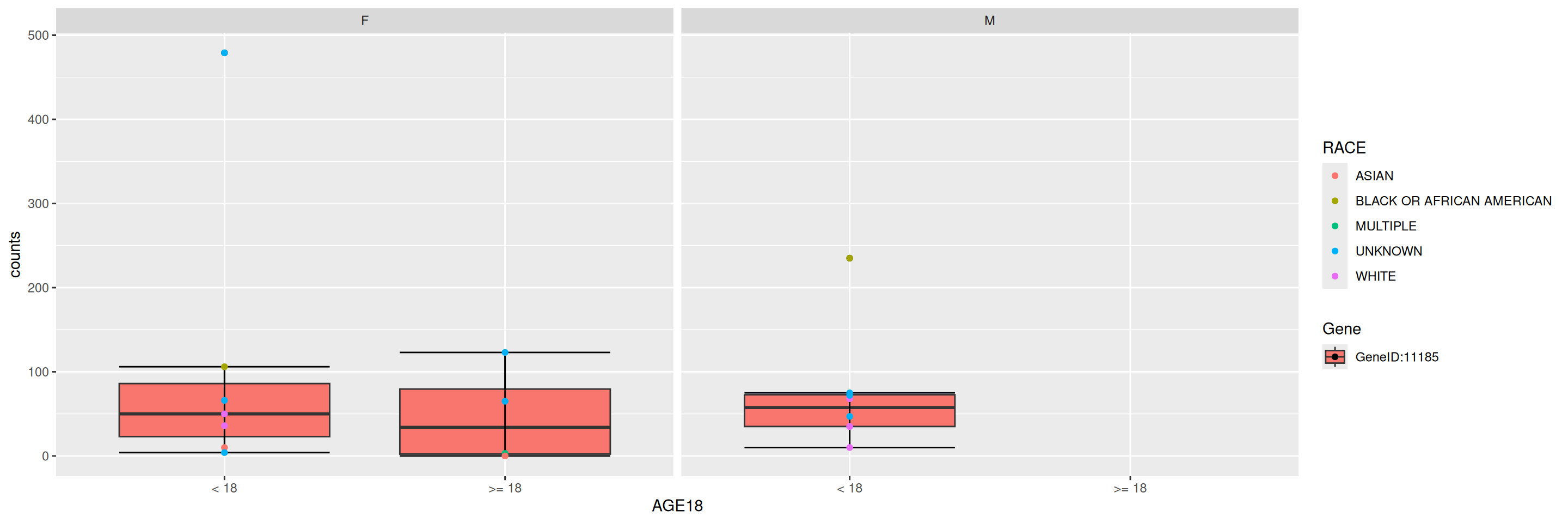
We can add sample variables for stratification (x_var), faceting (facet_var) or coloring (color_var).

Code
draw_boxplot(
  object = object,
  assay_name = "counts",
  genes = gene_spec(genes(object)[1]),
  x_var = "AGE18",
  facet_var = "SEX",
  color_var = "RACE"
)

We can also add jittering to the data points overlaying the boxplot using the jitter flag.

Code
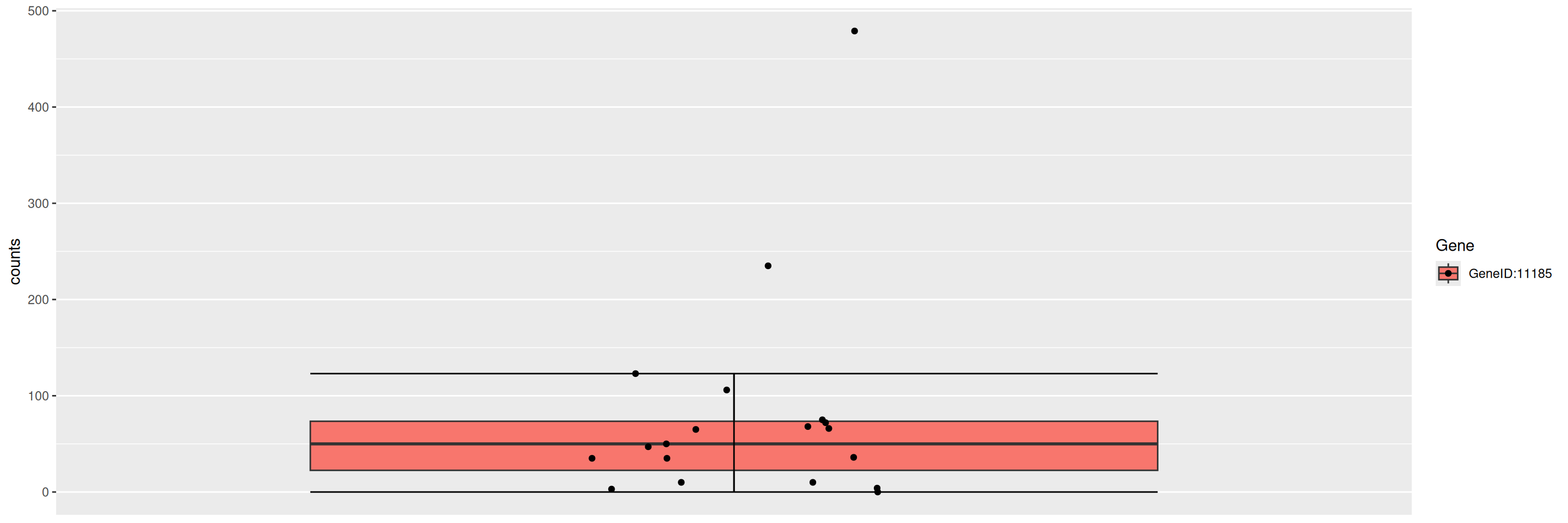
draw_boxplot(
  object = object,
  assay_name = "counts",
  genes = gene_spec(genes(object)[1]),
  jitter = TRUE
)

We can also create violin plots instead of boxplots using the violin flag.
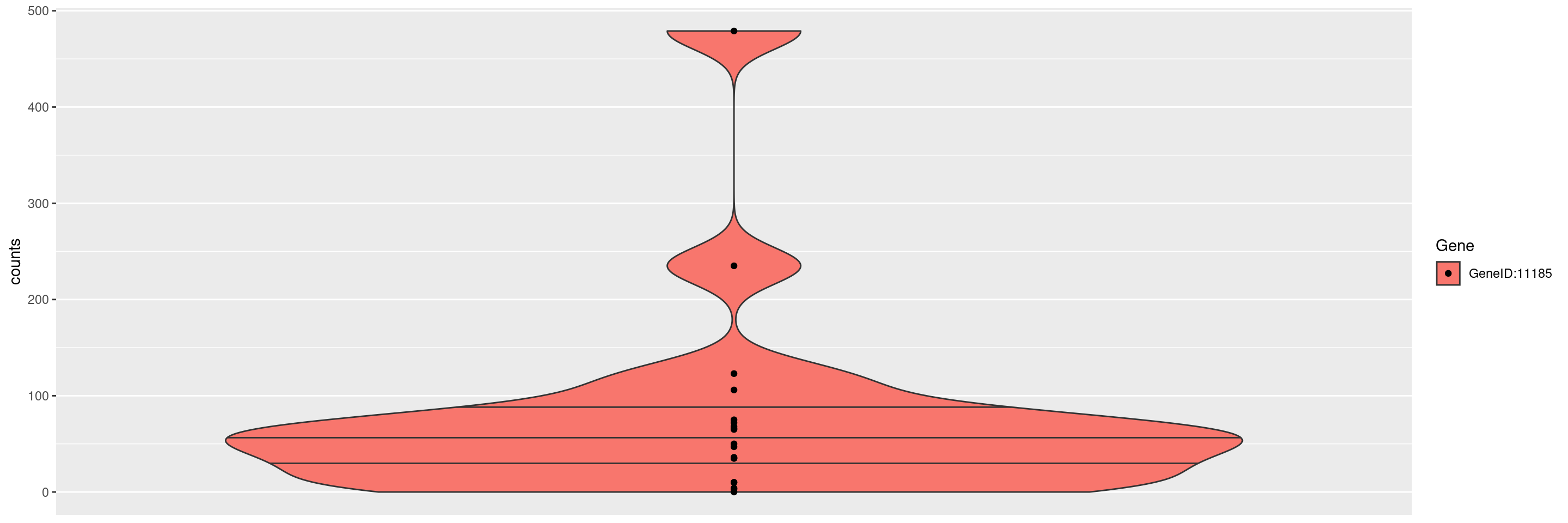
Code
draw_boxplot(
  object = object,
  assay_name = "counts",
  genes = gene_spec(genes(object)[1]),
  violin = TRUE
)
Warning in geom_violin(quantiles.linetype = c(0.75, 0.5, 0.25)): Ignoring
unknown parameters: `quantiles.linetype`

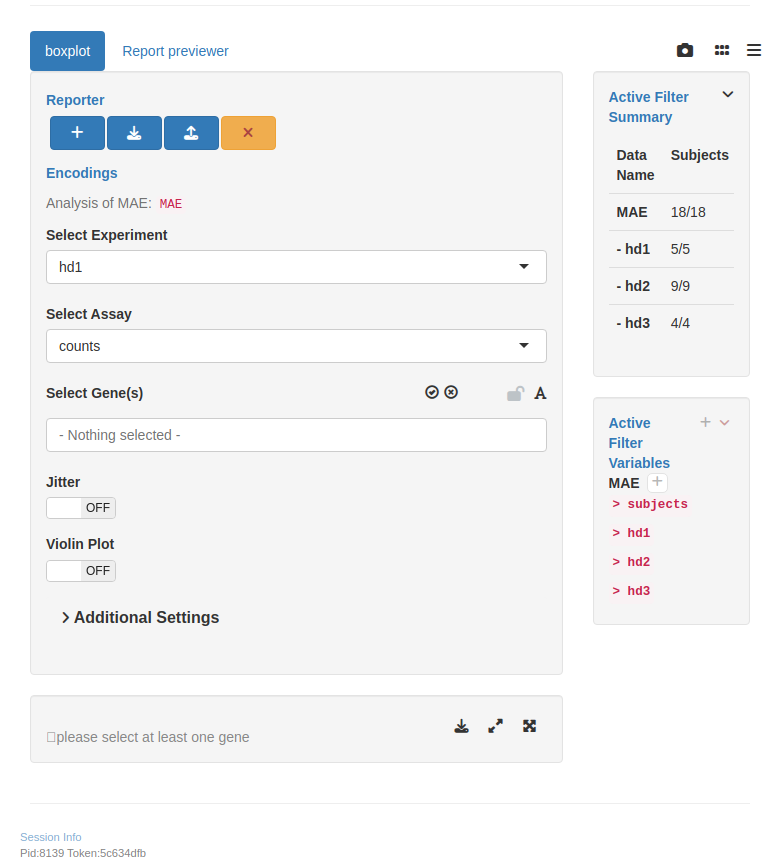
We start by importing a MultiAssayExperiment; here we use the example multi_assay_experiment available in hermes. It is wrapped as a teal::dataset. We can then use the provided teal module tm_g_boxplot to have a boxplot module in our teal app.

Code
library(teal.modules.hermes)

data <- teal_data()
data <- within(data, {
  library(hermes)
  MAE <- multi_assay_experiment
})
datanames(data) <- "MAE"
Warning: `datanames<-()` was deprecated in teal.data 0.7.0.
ℹ invalid to use `datanames()<-` or `names()<-` on an object of class
  `teal_data`. See ?names.teal_data
Code
app <- init(
  data = data,
  modules = modules(
    tm_g_boxplot(
      label = "boxplot",
      mae_name = "MAE"
    )
  )
)

shinyApp(app$ui, app$server)
Warning: 'experiments' dropped; see 'drops()'
Code
sessionInfo()
R version 4.5.2 (2025-10-31)
Platform: x86_64-pc-linux-gnu
Running under: Ubuntu 24.04.4 LTS

Matrix products: default
BLAS:   /usr/lib/x86_64-linux-gnu/openblas-pthread/libblas.so.3 
LAPACK: /usr/lib/x86_64-linux-gnu/openblas-pthread/libopenblasp-r0.3.26.so;  LAPACK version 3.12.0

locale:
 [1] LC_CTYPE=en_US.UTF-8       LC_NUMERIC=C              
 [3] LC_TIME=en_US.UTF-8        LC_COLLATE=en_US.UTF-8    
 [5] LC_MONETARY=en_US.UTF-8    LC_MESSAGES=en_US.UTF-8   
 [7] LC_PAPER=en_US.UTF-8       LC_NAME=C                 
 [9] LC_ADDRESS=C               LC_TELEPHONE=C            
[11] LC_MEASUREMENT=en_US.UTF-8 LC_IDENTIFICATION=C       

time zone: Etc/UTC
tzcode source: system (glibc)

attached base packages:
[1] stats4    stats     graphics  grDevices utils     datasets  methods  
[8] base     

other attached packages:
 [1] teal.modules.hermes_0.2.0   teal_1.1.0                 
 [3] teal.slice_0.7.1            teal.data_0.8.0            
 [5] teal.code_0.7.1             shiny_1.13.0               
 [7] hermes_1.14.0               SummarizedExperiment_1.40.0
 [9] Biobase_2.70.0              GenomicRanges_1.62.1       
[11] Seqinfo_1.0.0               IRanges_2.44.0             
[13] S4Vectors_0.48.0            BiocGenerics_0.56.0        
[15] generics_0.1.4              MatrixGenerics_1.22.0      
[17] matrixStats_1.5.0           ggfortify_0.4.19           
[19] ggplot2_4.0.2              

loaded via a namespace (and not attached):
  [1] RColorBrewer_1.1-3          jsonlite_2.0.0             
  [3] shape_1.4.6.1               MultiAssayExperiment_1.36.2
  [5] magrittr_2.0.5              farver_2.1.2               
  [7] rmarkdown_2.31              fs_2.0.1                   
  [9] GlobalOptions_0.1.4         ragg_1.5.2                 
 [11] vctrs_0.7.2                 memoise_2.0.1              
 [13] webshot_0.5.5               htmltools_0.5.9            
 [15] S4Arrays_1.10.1             forcats_1.0.1              
 [17] BiocBaseUtils_1.13.0        progress_1.2.3             
 [19] curl_7.0.0                  SparseArray_1.10.10        
 [21] sass_0.4.10                 bslib_0.10.0               
 [23] fontawesome_0.5.3           htmlwidgets_1.6.4          
 [25] httr2_1.2.2                 cachem_1.1.0               
 [27] teal.widgets_0.6.0          mime_0.13                  
 [29] lifecycle_1.0.5             iterators_1.0.14           
 [31] pkgconfig_2.0.3             webshot2_0.1.2             
 [33] Matrix_1.7-5                R6_2.6.1                   
 [35] fastmap_1.2.0               rbibutils_2.4.1            
 [37] clue_0.3-68                 digest_0.6.39              
 [39] colorspace_2.1-2            shinycssloaders_1.1.0      
 [41] ps_1.9.2                    AnnotationDbi_1.72.0       
 [43] DESeq2_1.50.2               textshaping_1.0.5          
 [45] RSQLite_2.4.6               filelock_1.0.3             
 [47] labeling_0.4.3              httr_1.4.8                 
 [49] abind_1.4-8                 compiler_4.5.2             
 [51] bit64_4.6.0-1               withr_3.0.2                
 [53] doParallel_1.0.17           S7_0.2.1                   
 [55] backports_1.5.1             bsicons_0.1.2              
 [57] BiocParallel_1.44.0         DBI_1.3.0                  
 [59] logger_0.4.1                biomaRt_2.66.2             
 [61] rappdirs_0.3.4              DelayedArray_0.36.1        
 [63] rjson_0.2.23                chromote_0.5.1             
 [65] tools_4.5.2                 otel_0.2.0                 
 [67] httpuv_1.6.17               glue_1.8.0                 
 [69] callr_3.7.6                 promises_1.5.0             
 [71] grid_4.5.2                  checkmate_2.3.4            
 [73] cluster_2.1.8.2             gtable_0.3.6               
 [75] websocket_1.4.4             tidyr_1.3.2                
 [77] hms_1.1.4                   XVector_0.50.0             
 [79] ggrepel_0.9.8               foreach_1.5.2              
 [81] pillar_1.11.1               stringr_1.6.0              
 [83] limma_3.66.0                later_1.4.8                
 [85] circlize_0.4.18             dplyr_1.2.1                
 [87] BiocFileCache_3.0.0         lattice_0.22-9             
 [89] bit_4.6.0                   tidyselect_1.2.1           
 [91] ComplexHeatmap_2.26.1       locfit_1.5-9.12            
 [93] Biostrings_2.78.0           knitr_1.51                 
 [95] gridExtra_2.3               teal.logger_0.4.1          
 [97] edgeR_4.8.2                 xfun_0.57                  
 [99] statmod_1.5.1               stringi_1.8.7              
[101] yaml_2.3.12                 shinyWidgets_0.9.1         
[103] evaluate_1.0.5              codetools_0.2-20           
[105] tibble_3.3.1                cli_3.6.5                  
[107] xtable_1.8-8                systemfonts_1.3.2          
[109] Rdpack_2.6.6                jquerylib_0.1.4            
[111] processx_3.8.7              dichromat_2.0-0.1          
[113] Rcpp_1.1.1                  teal.reporter_0.6.1        
[115] dbplyr_2.5.2                png_0.1-9                  
[117] parallel_4.5.2              assertthat_0.2.1           
[119] blob_1.3.0                  prettyunits_1.2.0          
[121] scales_1.4.0                purrr_1.2.1                
[123] crayon_1.5.3                GetoptLong_1.1.0           
[125] rlang_1.2.0                 KEGGREST_1.50.0            
[127] formatR_1.14                shinyjs_2.1.1              

Reuse

Copyright 2023, Hoffmann-La Roche Ltd.
RNAG6
RNAG8
Source Code
---
title: RNAG7
subtitle: RNAseq Boxplot
categories: [RNAG]
---

------------------------------------------------------------------------

{{< include ../misc/hooks.qmd >}}

::: panel-tabset
## Setup: Import, Filter and Normalize

This page can be used as a template of how to create boxplots for RNA-seq gene expression data using available `hermes`, and to create interactive boxplot for RNA-seq gene expression analysis using `teal.modules.hermes`.

The `draw_boxplot()` function used below needs `HermesData` as input.
See [RNAG1](../graphs/rnag01.qmd) for details on how to import, filter and normalize `HermesData`.

```{r, message = FALSE}
library(hermes)
object <- hermes_data %>%
  add_quality_flags() %>%
  filter() %>%
  normalize()
```

## Boxplot for Single Gene Expression Values

We can create boxplots for expression values of single genes by providing the gene ID in a `gene_spec` (gene specification) as follows.

```{r}
draw_boxplot(
  object = object,
  assay_name = "counts",
  genes = gene_spec("GeneID:11185")
)
```

## Boxplot for Multiple Genes Expression Values

We can also create boxplots for multiple genes next to each other, simply by specifying multiple gene IDs in the `gene_spec`.
Note that names given to the gene ID vector are used in the plot instead of the IDs.

```{r}
draw_boxplot(
  object = object,
  assay_name = "counts",
  genes = gene_spec(c(
    A = "GeneID:11185", B = "GeneID:10677", C = "GeneID:286205", D = "GeneID:8365", E = "GeneID:6804"
  ))
)
```

## Boxplot for Gene Signatures

We can also specify a gene summary function for multiple genes, thereby using the corresponding gene signature.
Note that here we just want to use the first 6 genes from the `object` without explicitly specifying the gene IDs, and this can be done through the `genes()` function in `hermes`.

```{r}
draw_boxplot(
  object = object,
  assay_name = "counts",
  genes = gene_spec(genes(object)[1:6], fun = colMeans)
)
```

## Additional Options for Customization

We can add sample variables for stratification (`x_var`), faceting (`facet_var`) or coloring (`color_var`).

```{r}
draw_boxplot(
  object = object,
  assay_name = "counts",
  genes = gene_spec(genes(object)[1]),
  x_var = "AGE18",
  facet_var = "SEX",
  color_var = "RACE"
)
```

We can also add jittering to the data points overlaying the boxplot using the `jitter` flag.

```{r}
draw_boxplot(
  object = object,
  assay_name = "counts",
  genes = gene_spec(genes(object)[1]),
  jitter = TRUE
)
```

We can also create violin plots instead of boxplots using the `violin` flag.

```{r}
draw_boxplot(
  object = object,
  assay_name = "counts",
  genes = gene_spec(genes(object)[1]),
  violin = TRUE
)
```

## Teal Module for Boxplot

We start by importing a `MultiAssayExperiment`; here we use the example `multi_assay_experiment` available in `hermes`.
It is wrapped as a `teal::dataset`.
We can then use the provided teal module `tm_g_boxplot` to have a boxplot module in our teal app.

```{r,  message = FALSE, cache = FALSE, opts.label=c('app')}
library(teal.modules.hermes)

data <- teal_data()
data <- within(data, {
  library(hermes)
  MAE <- multi_assay_experiment
})
datanames(data) <- "MAE"

app <- init(
  data = data,
  modules = modules(
    tm_g_boxplot(
      label = "boxplot",
      mae_name = "MAE"
    )
  )
)

shinyApp(app$ui, app$server)
```

{{< include ../misc/session_info.qmd >}}
:::

Made with ❤️ by the Statistical Engineering Team StatisticalEngineering

  • License

  • Edit this page
  • Report an issue
Cookie Preferences