Filter Panel
NEST CoreDev
2023-07-12
filter-panel.Rmd
teal apps with the filter panel
The filter panel is an integral part of all teal
applications and is included on the right side. Based on the selections
made in the filter panel, filter expressions are executed before passing
data to teal modules. The technical details of the filter
panel are extensively described in teal.slice
documentation.
By default, teal::init initializes the filter panel
without any active filters but allows the user to add filters on any
column. To start a teal application with predefined
filters, one must to specify the filter argument. In the
following example four filters are specified using the
teal_slice function and wrapped together with
teal_slices.
library(teal)

app <- init(
  data = teal_data(
    dataset("IRIS", iris, code = "IRIS <- iris"),
    dataset("CARS", mtcars, code = "CARS <- mtcars")
  ),
  modules = example_module(),
  filter = teal_slices(
    teal_slice(dataname = "IRIS", varname = "Sepal.Length"),
    teal_slice(dataname = "IRIS", varname = "Species", selected = "setosa"),
    teal_slice(dataname = "CARS", varname = "mpg", selected = c(20, Inf)),
    teal_slice(dataname = "CARS", expr = "qsec < 20", title = "1/4 mile under 20 sec", id = "qsec_20")
  )
)

if (interactive()) {
  runApp(app)
}
Extending teal.slice
Filter panel respective to teal_module
Each teal_module (see ?module) object
contains the filters attribute that determines which data
sets are to be sent to that module. The filter panel will display only
those data sets and hide the rest when this module is active.
library(teal)

app <- init(
  data = teal_data(
    dataset("IRIS", iris, code = "IRIS <- iris"),
    dataset("CARS", mtcars, code = "CARS <- mtcars")
  ),
  modules = modules(
    example_module(label = "all datasets"),
    example_module(label = "IRIS only", datanames = "IRIS"),
    example_module(label = "CARS only", datanames = "CARS"),
    example_module(label = "no filter panel", datanames = NULL)
  )
)
if (interactive()) {
  runApp(app)
}
Global and module specific filter panel
teal contains the teal_slices function that
extends the original teal_slices found in
teal.slice by adding two arguments:
module_specific and mapping. By default
teal::init initializes app with a “global” filter panel,
where all modules use the same filters. Setting
module_specific = TRUE switches to a “module-specific”
filter panel, where each module can have a different set of filters
active. It is still possible to set global filters that will be shared
among modules.
One possible scenario is depicted in the figure below:
-
filter 1is shared by all modules -
filter 2is shared bymodule 1andmodule 3
-
filter 3is used only bymodule 2 -
filter 4is used only bymodule 1 -
filter 5andfilter 6are not active in any of the modules
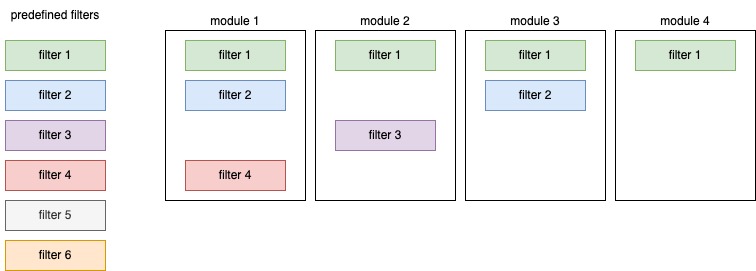
To achieve the described setup, one must use the mapping
argument to appropriately match each teal_module with its
respective teal_slice. mapping takes a named
list where each element is named with a module’s label and
contains a vector of teal_slice ids. These
elements will active in that module at startup. In addition,
teal_slices whose ids are enumerated in the
global_filters element of mapping will be
applied to all modules in the app.
library(teal)

app <- init(
  data = list(mtcars = mtcars),
  modules = modules(
    example_module(label = "module 1"),
    example_module(label = "module 2"),
    example_module(label = "module 3"),
    example_module(label = "module 4")
  ),
  filter = teal_slices(
    # filters created with id
    teal_slice(dataname = "mtcars", varname = "mpg", id = "filter 1"),
    teal_slice(dataname = "mtcars", varname = "cyl", id = "filter 2"),
    teal_slice(dataname = "mtcars", varname = "disp", id = "filter 3"),
    teal_slice(dataname = "mtcars", varname = "hp", id = "filter 4"),
    teal_slice(dataname = "mtcars", varname = "drat", id = "filter 5"),
    teal_slice(dataname = "mtcars", varname = "wt", id = "filter 6"),

    # filters mapped to modules
    mapping = list(
      "module 1" = c("filter 2", "filter 4"),
      "module 2" = "filter 3",
      "module 3" = "filter 2",
      global_filters = "filter 1"
    )
  )
)

if (interactive()) {
  runApp(app)
}